Dataset#
Before starting this tutorial, it is recommended to read one of the following documents first:
Data Caching#
In previous tutorials, you may have noticed that when using the same dataset to start multiple training sessions, XTuner by default spends some time loading the dataset each time. For small datasets, this time may not be obvious, but if your dataset is very large, the training startup time each time will be a disaster.
In fact, this loading process mainly involves preprocessing the dataset and performing some length statistics on training samples to facilitate controlling the sampling order during training and improving efficiency during the training phase. The specific process is as follows:
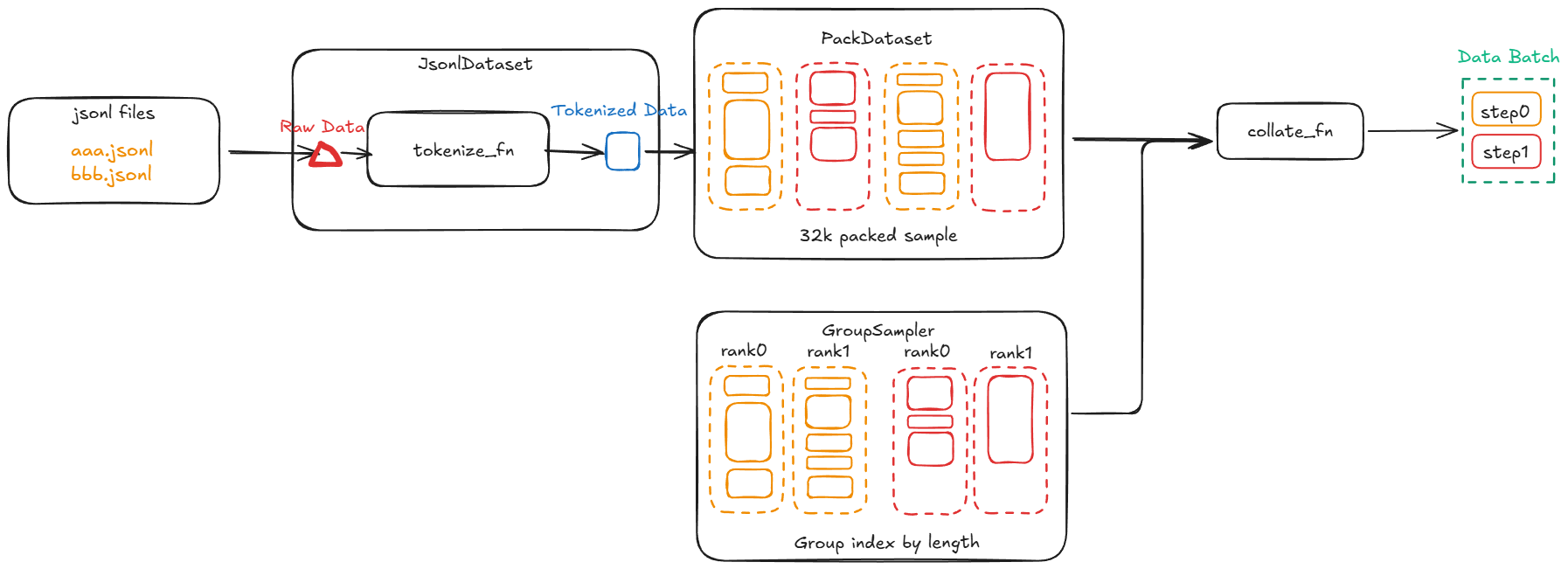
Data Preprocessing#
Since this preprocessing process is cacheable, XTuner provides a caching function for datasets, allowing preprocessed datasets to be reused, greatly reducing secondary startup time.
from xtuner.v1.datasets import DatasetConfig

dataset_cfg = DatasetConfig(
    cache_dir='work_dirs/dataset_cache', # Specify cache directory
)
Specifically, the caching function determines whether the cache hits based on the following conditions:
Hash of the
jsonlfile itselfSource code implementation corresponding to
tokenize_fnHash of the
tokenizeritself
Once any of the above conditions are not met, the cache will become invalid and the dataset will be reprocessed. Strict cache checking mechanisms can certainly ensure cache correctness, but they also bring some inconvenience. For example, you are debugging data processing functions and frequently modifying source code. However, at this time you don’t want to trigger data cache every time, preventing you from reaching the breakpoint you care about.
To avoid this situation, you can specify cache_tag while specifying the cache directory, so that as long as cache_tag remains unchanged, the cache will always hit.
dataset_cfg = DatasetConfig(
    cache_tag='v0.0.1', # Specify cache directory
)
Custom Dataset#
In the previous tutorial, we learned how to use XTuner’s pre-supported dataset format for training. What if we have custom data formats and conversation templates? This section will show you how to write custom dataset processing functions and apply them to fine-tuning training.
Note
Supporting datasets in formats other than jsonl will be more complex, you can refer to Advanced Tutorial,
Currently, XTuner only supports jsonl format datasets, requiring each line to be a valid JSON object. The default TokenizeFnConfig.build will construct a TokenizeFn to parse each line of data in the jsonl into a format that conforms to the XTuner data protocol. So what is a legal XTuner data protocol? In fact, it’s very simple, only TokenizeFn needs to return a dictionary containing the following fields:
{
    'input_ids': [...], # Input token id list, used for actual training
    'labels': [...],    # Unshifted labels, same length as `input_ids`, positions not calculated for loss are filled with -100
    'num_tokens': ...   # How many tokens the current sample has, convenient for length-based balanced sampling
}
Therefore, to parse custom data formats and use custom conversations, we only need to implement a TokenizeFnConfig, and let its build method return a callable object that conforms to the TokenizeFn interface protocol. For example, we want to parse json files in the following format:
:caption: Custom json format
{"instruction": "Please introduce yourself.", "output": "I am a language model powered by artificial intelligence, designed to help users solve various problems."}
{"instruction": "What is artificial intelligence?", "output": "Artificial Intelligence (AI) refers to technologies and methods that simulate human intelligence through computer systems."}
We can implement a MyTokenizeFnConfig to parse the above format:
from pydantic import BaseModel
from xtuner.v1.datasets import CachableTokenizeFunction, tokenizer_xxhash

class MyTokenizeFn(CachableTokenizeFunction):
    # Built by `TokenizeFnConfig.build`, tokenizer will be passed in
    def __init__(self, tokenizer, max_length=2048):
        self.tokenizer = tokenizer
        self.max_length = max_length
        self._hash = None

    # item is a line of data in jsonl, already parsed into a dictionary
    def __call__(self, item):
        instruction = item['instruction']
        output = item['output']

        input_ids = self.tokenizer.encode(f"Instruction: {instruction}\nResponse: {output}", add_special_tokens=True)
        input_ids = input_ids[:self.max_length]
        labels = input_ids
        num_tokens = len(input_ids)

        return {"input_ids": input_ids, "labels": labels, "num_tokens": num_tokens}

    # This hash is used for data caching, when max_length or tokenizer changes, cache needs to be re-triggered
    def hash(self):
        if self._hash is None:
            self._hash = f"{tokenizer_xxhash(self.tokenizer)}_{self.max_length}"

        return self._hash


class MyTokenizeFnConfig(BaseModel):
    max_length: int = 2048

    def build(self, tokenizer, **kwargs):
        return MyTokenizeFn(tokenizer, max_length=self.max_length)
After that, we only need to reference this MyTokenizeFnConfig in the configuration file:
from cusomt_tokenize_fn import MyTokenizeFnConfig

dataset_cfg = [
    {
        ...
        "tokenize_fn": MyTokenizeFnConfig(max_length=2048),  # Use custom TokenizeFnConfig
    },
]
Important
It is not recommended to implement TokenizeFnConfig directly in the configuration file, but to put it in a separate Python file and reference it in the configuration file. Configuration and code implementation should be separated, which helps with experiment management and code maintenance